


When it comes to music discovery, visuals matter. We know how much you already love using Songfly's one-click digital ad tool to run campaigns across Instagram, Facebook, and TikTok. We are thrilled to announce a new addition to your digital ad stack: You can now launch automated YouTube campaigns directly from your dashboard!
YouTube is the world's biggest music discovery engine, and getting your tracks in front of the right viewers has never been easier. Whether you have a high-production music video, a lyric video, or a simple visualizer, our new YouTube ad integration lets you seamlessly turn viewers into dedicated fans with just a few clicks.
Here is everything you need to know about this powerful new channel, the benefits of promoting on YouTube, and how to get your first campaign live in minutes.
Why You Should Be Running YouTube Campaigns
Promoting on YouTube is best to help you build a deeper connection with your audience. Here is why adding YouTube to your Songfly digital ad strategy is a game-changer for your releases:
- Massive Discovery Engine: Billions of users go to YouTube every single month specifically to discover and consume music. Your next super-fan is already watching…you just need to put your track in front of them.
- Visual Storytelling: A track combined with visual elements helps listeners connect a face, an aesthetic, and a vibe to the audio. This creates a stronger, more memorable bond than audio alone.
- Trigger the Algorithm: Driving highly targeted, quality ad traffic to your YouTube video can create a snowball effect. As engagement goes up, YouTube's recommendation algorithm is more likely to push your video out to similar listeners organically.
- Unified Campaign Management: You no longer need to manage complex Google Ad accounts. You can now run Instagram, Facebook, TikTok, and YouTube ads all from one single, easy-to-use hub.
How to Launch Your First YouTube Campaign
Setting up your YouTube ad is incredibly simple. Just follow these steps:
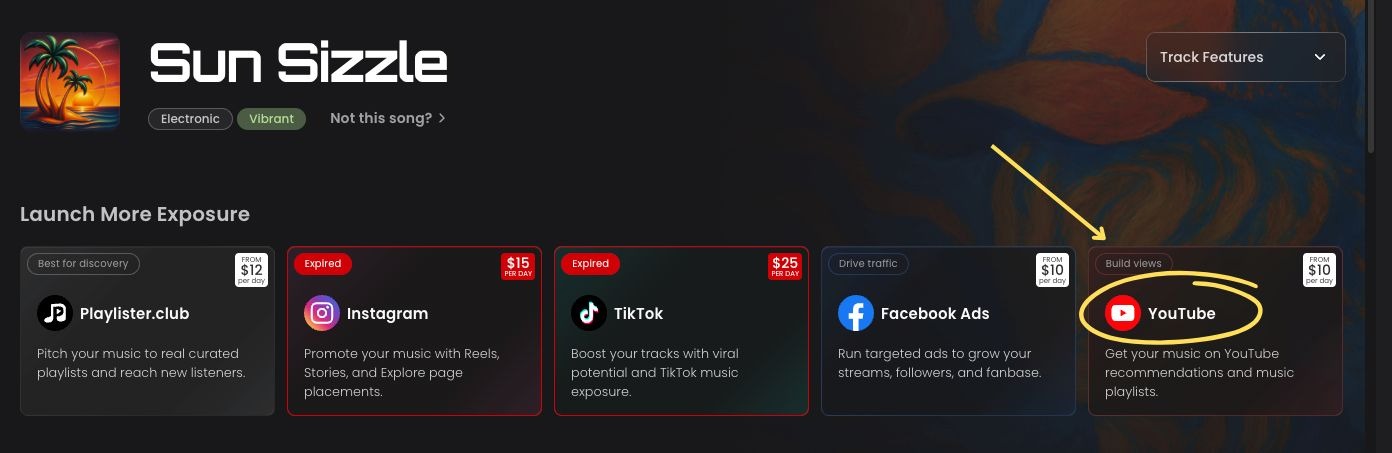
- Select Your Track: Once you've selected the track you want to promote within your dashboard, you will now see an option to promote on YouTube within your Marketplace page.
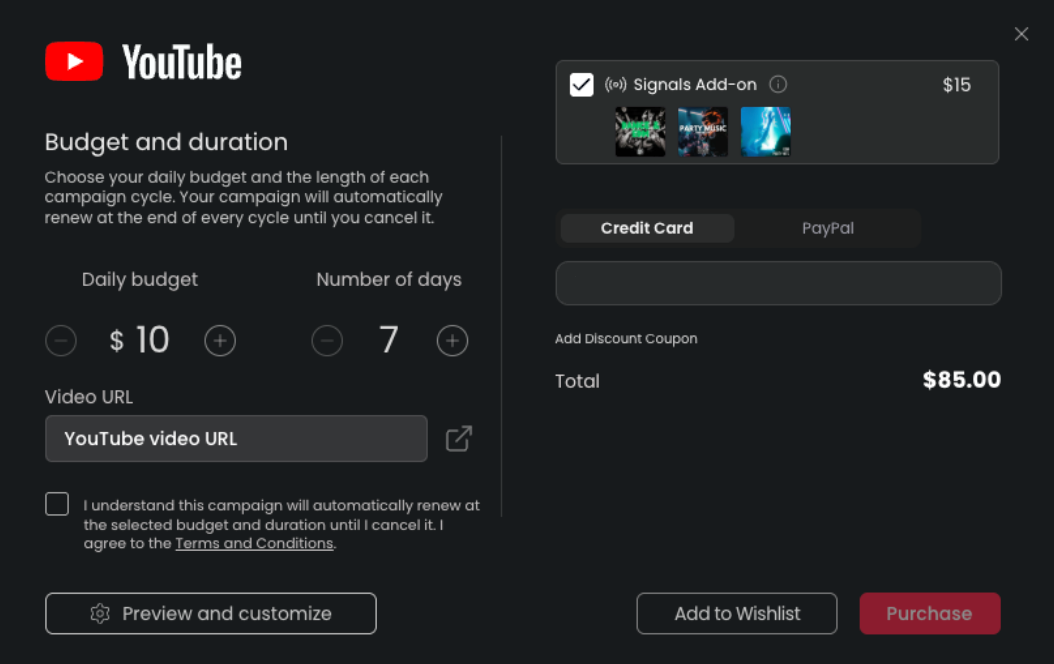
- Open Checkout: Click on the YouTube box to open your checkout screen.
- Set Budget & Timeline: Here, you will set your daily budget and campaign timeline exactly as you usually do.
- Add Your Destination Link: You will need to input the YouTube video URL that you want your ad to lead to. (Note: This means that any URL you input here is exactly where audiences will be led to watch your video!)
- Go Live: Once you have that all set up, complete your purchase and your YouTube ad is live!
How to Track Results and Manage Settings
Once your campaign is running, monitoring your success and making adjustments is fully transparent.
Checking Your Analytics by heading to the Digital Ads tab (located on the left-hand sidebar). Here you will see the status and performance of all your actively running campaigns.
- Remember: "New fans" are people who saw your ad, clicked on it, and then went to the platform listed.

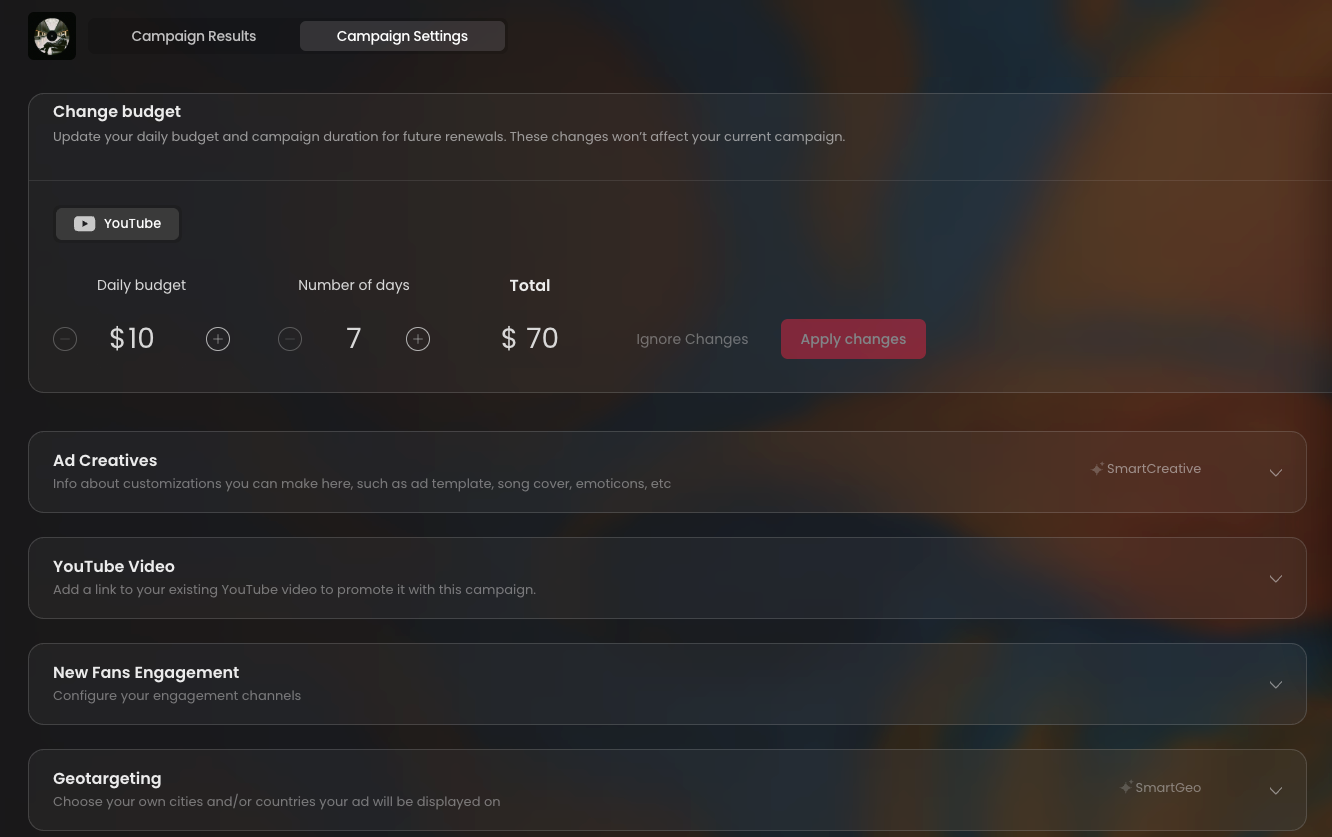
Managing Your Campaign Settings Need to make a tweak? You can always click on the "Campaign Settings" page and scroll down to apply any changes on the fly. From here you can:
- Change the budget for your active YouTube campaign.
- Add a link to your existing YouTube video to ensure you are promoting exactly what you want with this campaign.
And that's it! It is a super easy, one-click ad tool to promote your releases on YouTube and take your marketing to the next level.
FAQs
Do I need an official, high-budget music video to run a YouTube campaign?
Not at all! While official music videos work great, you can also run campaigns that lead to lyric videos, visualizers, or even just high-quality static artwork videos with your audio.
Where exactly do audiences go when they click on my ad?
They are directed straight to the YouTube video URL that you input during the checkout process.
Can I adjust my budget after the campaign has already started?
Yes. You can easily adjust your daily budget by navigating to your Digital Ads tab, clicking on "Campaign Settings," and updating your budget there.
Can I run Instagram, Facebook, TikTok, and YouTube ads at the same time?
Absolutely. Songfly is designed to be your complete ad stack. Running multiple channels at once is a great way to maximize your track's exposure across the internet.
Key Takeaways
- New Channel Unlocked: You can now launch automated YouTube ad campaigns directly from your Songfly Marketplace page.
- Easy Setup: Just select your track, set your budget, input your YouTube video URL, and check out.
- Clear Tracking: Monitor your "New Fans" directly from the Digital Ads tab to see exactly how many people clicked through to watch your video.
- Total Control: Easily change your budgets or update your destination links at any time via the Campaign Settings page.
Photo by Alexander Shatov on Unsplash


