


As the Signals Marketplace has just been released, you likely have a few questions about how to approach it, how to send your first Signal, and how to start experimenting. Keep reading for the best tips and tricks to optimize your Signals and get the most out of this innovative new communication layer for the indie music industry. Let's dive in!
What is the Signals Marketplace?
In case you missed it, Signals is the next communication layer for the independent music industry. It's a new marketplace that connects artists directly with the playlist curators who actually fit their sound.
Signals matches your song to playlists based on genre, sound, and real activity levels, so you are never left guessing whether a playlist is still alive. You can send a Signal—a recorded video or written message—to one specific playlist or a curated Bundle. This allows you to communicate on a deeper level, explain the background of your song, and highlight why it is a great fit for their listeners.
Curators will then send back a real reaction on camera within 72 hours. If there is no response? You are automatically and fully refunded. It is playlist outreach that finally feels like a conversation, not a cold submission.
Key Terms You Need to Know
Here is a quick breakdown of the terminology used within the Signals Marketplace:
- Signal: The video or written message that you send to an individual playlist (or bundle) to pitch your track.
- Marketplace: The page within your dashboard where you scroll through opportunities curated specifically for your track.
- Bundles: Custom-built groups of playlists tailored to your sound that you can pitch in one click. These include a lead playlist with the highest follower count, and supporting playlists chosen for broader reach or stronger fit.
- Wishlist: The "shopping cart" for your campaign. You can drag and drop playlists and bundles here to build out your perfect strategy before making a purchase.
- Credit: The currency used to send Signals. Different playlists cost different credit amounts based on factors like size and activity level.
- Wallet: Where you track your credit activity. It shows your available balance, spent credits, and refunded credits.
- Rewards: Bonus credits added to select wallet purchases that can be used on future campaigns.
How and Where to Send a Signal
At the moment, there are two different ways to build and send your Signals within your dashboard:
1. The "Track Features" Dropdown
Open the "Track Features" dropdown in the top right corner of your Marketplace page. From here, you can record or write your Signal for a specific track to send to any individual playlist or bundle.
This is where you can save a general Signal for your track, meaning you won't have to re-record it each time you send a new pitch.

2. Building Your Wishlist
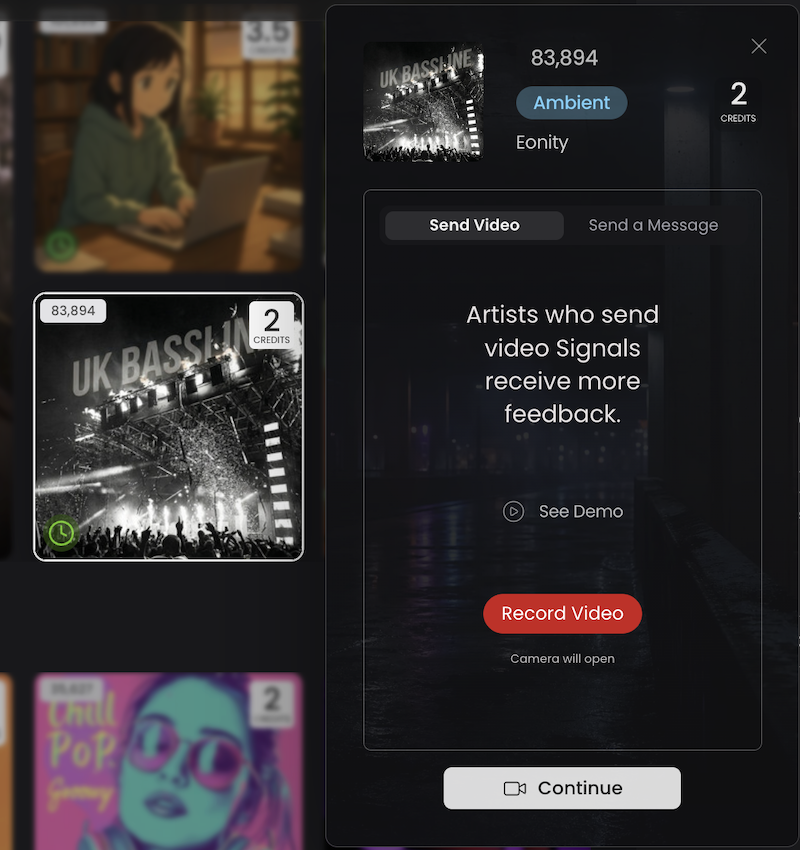
As you browse the Marketplace, and find a playlist or bundle that catches your eye, click on it to view a quick breakdown. From there, just hit "Continue" to send a Signal for that specific opportunity.
This approach lets you handpick your targets and record a unique, personalized video for each pitch.
The Do's and Dont's of Signals
DO's:
- Prioritize Video: We always recommend creating a Video Signal instead of sending a written message. Video gives playlisters a more personal, engaging introduction to you and your track.
- Maximize Your Time: Your video must be at least 8 seconds long. Use that time to briefly introduce yourself, explain what makes your song unique, share helpful context about the release, and invite the playlister to consider it.
- Be Clear and Natural: Keep your video focused and personal. Speak naturally to help the playlister understand why your song is a strong fit.
- Keep Written Signals Concise: If you prefer to write your Signal, keep it short. Explain why the song fits the playlist and mention any context that helps the curator understand the release.
- Stay Authentic: Always remain true to your image and artist brand.
DONT's:
- Don't over-script: You do not need to create a rigid, memorized pitch. Let your personality show.
- Don't use spammy language: Avoid overly generic, copy-and-paste phrasing for both video and written signals.
- Don't ramble: Avoid including unnecessary or irrelevant information that distracts from the track itself.
- Don't ignore your lighting and audio: If recording a video, ensure the curator can clearly see your face and hear your voice without distracting background noise.
- Don't get discouraged by a skip: Music is highly subjective. A skip simply helps you narrow down your true audience and saves you time in the long run.
General Guidelines & FAQ's
What's the best time or order to send Signals?
Sending a Signal is the perfect way to complement your broader Playlisting or Digital Ad campaigns. While these campaigns expose your track to a wider network of playlisters or listeners on social media, Signals allow you to specifically target fitting and appropriate playlists.
You can send a Signal right before or right after you launch a campaign—though running them concurrently is a highly effective strategy. That being said, you can send a Signal at any moment; you do not need to have an active ad campaign running to use the Marketplace.
How many Signals can I send?
You have unlimited opportunities. You can send as many or as few Signals as you choose, depending entirely on which playlists or bundles appeal to you in your Marketplace. However, the more Signals you send, the more chances you have to connect with playlisters and get them to engage with your track.
What do Playlisters do when they receive my Signal?
To ensure they don't miss your pitch, playlisters are notified via SMS and email as soon as you send a Signal. The playlister then has 72 hours to review it. They must listen to your song for at least 15 seconds before the decision flow unlocks, at which point they can choose to skip, review, or place the song into their playlist. As long as the playlister reviews your track within that 72-hour window, the credit is used and the Signal is considered complete.
Key Takeaways
- Targeted, Not Random: The Signals Marketplace removes the guesswork from playlist pitching by exclusively serving opportunities that algorithmically match your song's genre, mood, and sound.
- Authenticity Wins: Prioritizing personalized, face-to-camera Video Signals over generic text helps you build genuine relationships with curators rather than just firing off cold submissions.
- Risk-Free Engagement: With the strict 72-hour review window and an automatic refund policy for unanswered pitches, your outreach budget is never wasted on inactive playlists.
- A Comprehensive Strategy: While Signals are highly effective on their own, pairing this targeted outreach alongside playlisting and digital ad campaigns creates a powerful, two-pronged approach to growing your listener base.
Once you get the hang of it, you'll see that this is a revolutionary way to handle playlist outreach. It finally feels like a conversation, not a cold submission. Remember that all of the opportunities in your Marketplace are specifically custom-tailored for your track. These suggestions are not random; they were placed there because the system matched them exactly to your track's genre, mood, and sound.
This is the opportunity you've been waiting for to find the most fitting place for your track and to truly pitch to playlisters in an authentic, genuine, and efficient way!
Photo by Ron Lach on Pexels


