


We have completely leveled up the artist experience on Songtools to make sure you get the most out of your promotions. While optimizing our current tools and systems, we are also introducing a completely new way of promoting that comes packed with features designed for you to enjoy and take advantage of.
Follow along for a complete breakdown of the brand-new artist dashboard. This guide covers everything you need to know to get started, maximize your campaigns, and get your music growing in front of the right audience on V2 of Songtools.
What's the Same?
Before we dive into the new features, rest assured that your favorite essentials aren't going anywhere:
- Traditional Promotional Tools: You still have full access to our Playlisting campaigns and Digital Ad campaigns across Instagram, TikTok, and Facebook (with YouTube coming soon, keep an eye out!).
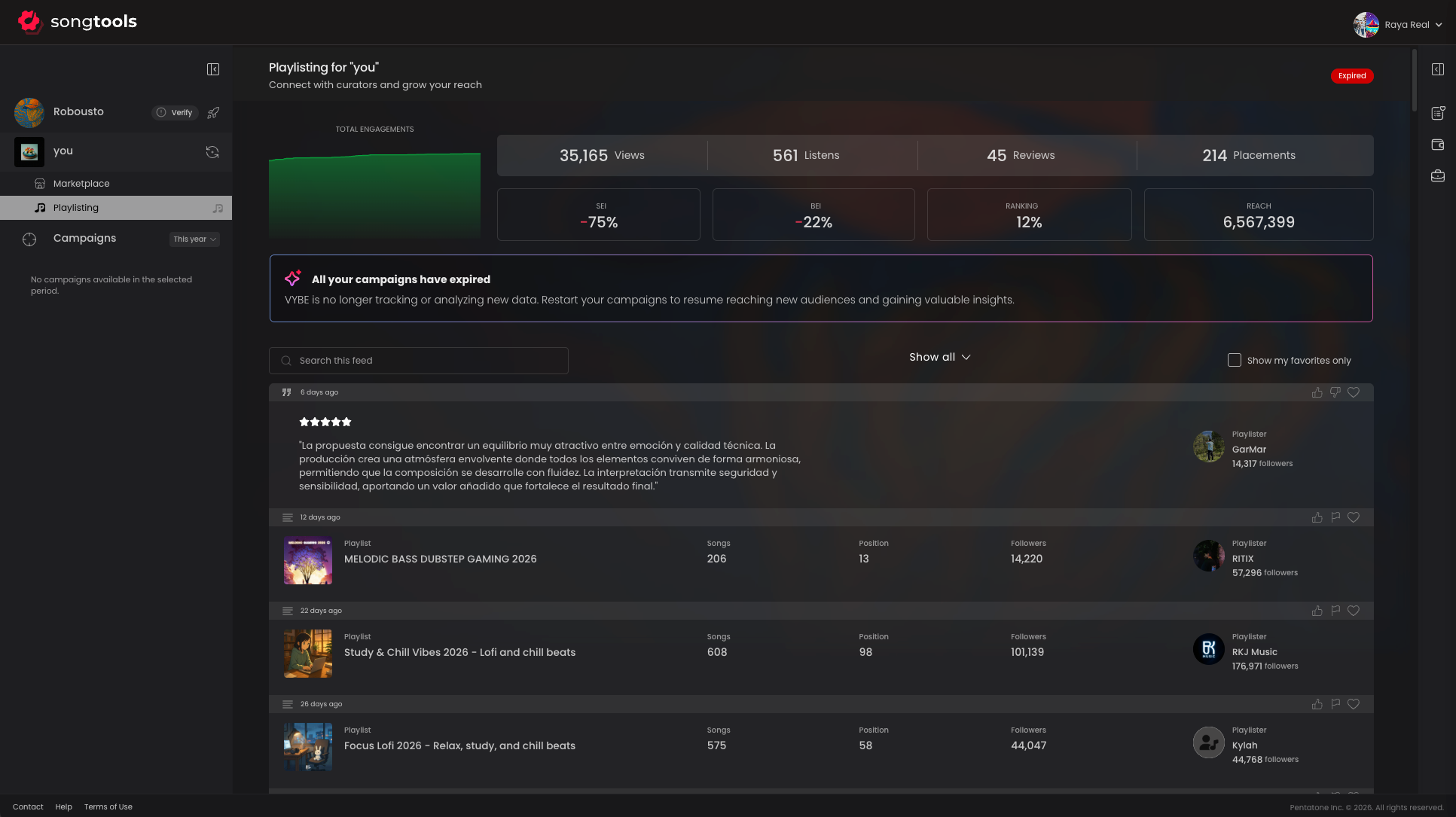
- Results and Metrics: You can still easily track your campaign performance. Simply open the sidebar and click on "Playlisting" or "Digital ads" under your track name to view your results and metrics pages.
What's New?
V2 of the Songtools artist dashboard introduces major upgrades to streamline your workflow and expand your reach. Here is a breakdown of the new features and layout changes to explore.
Dashboard Layout
We've introduced a sleek, newly designed dashboard to make managing current and past campaigns easier than ever.
Dual Sidebars for Better Navigation:
- Left Sidebar: Access your campaigns, view growth and results, change the song you are viewing, or search for a new track (Click "Change Song" and input the Spotify track ID or URL).
- Right Sidebar: Access your brand-new Wishlist, Wallet, and Portfolio.
The Marketplace:
When on a selected track, you will now see the "Marketplace" option.
- Scrolling through the Marketplace, you will first see our traditional campaigns.
- As you continue, you will discover brand-new opportunities to directly target for your track, including: Curator Playlist Bundles, Premium Playlist Access, Playlists That Perform, Made For Your Sound, Premium Opportunities, and You Should Also Consider.

This is exactly where the brand-new Signals Marketplace comes in. Keep reading to see how our biggest update yet can transform your reach!
What are Signals?
Signals is the next communication layer for the independent music industry. It is a new marketplace that connects you directly with curators whose playlists actually fit your sound.
Signals matches your song to playlists based on genre, sound, and real activity levels, so you are never guessing if a playlist is dead or inactive. You can send your track to one specific playlist or a curated Bundle, accompanied by a written message or a quick video.
The best part? Curators will send back a real reaction on camera or written review within 72 hours. If you get no response, you are fully and automatically refunded. It's playlist outreach that finally feels like a real conversation, rather than a cold submission.
Signals is built around:
- Direct outreach: Go straight to the playlists that fit your song, skipping the queue.
- Targeted options: Pitch to a single perfect-fit playlist, or an entire curated bundle built around your sound.
- A credit-based wallet: Spend only on the exact opportunities you want.
- Reusable wishlists: Save your shortlists by song with no pressure to buy on the spot.
- Video communication: Put a face and a voice behind your pitch to get a real reaction back.
How to Send Signals
Step 1: Select your artist and song
- Artist Accounts: Click the "Change Song" icon in the top-left sidebar to search your discography by title or Spotify Track ID.
- Label Accounts: Click the Artist Name linked in the top-left sidebar to select the preferred artist, then search by song title or Spotify Track ID.
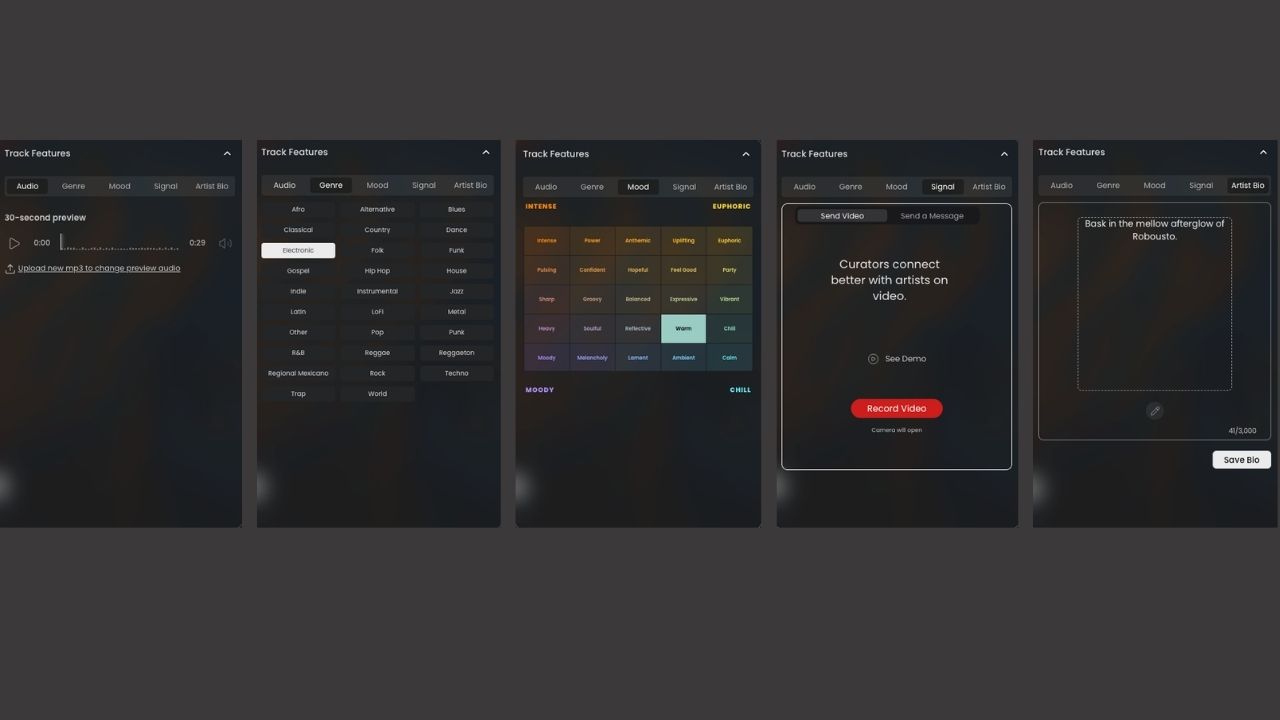
Step 2: Review your Track Features
In the top-right of your Signals marketplace, open the "Track Features" tab. Editing these global features ensures your profile is fully optimized across all channels:
- 30-second audio preview: The clip played for playlisters and used in your ads.
- Genre: The overarching tag used to match your song in our system.
- Mood: The secondary tag used to build custom bundles and recommendations.
- Signal: A saved video or written message that you can easily attach to future submissions without needing to re-record.
- Artist Bio and Profile Information: The story and background that gives playlisters a complete picture of who you are.
Step 3: Browse Opportunities and add them to your Wishlist.
Explore individual playlists, bundles, and channels in the marketplace. Save the playlisters and bundles you want to target.
- The Wishlist acts just like a shopping cart, allowing you to drag and drop playlists, bundles, and channels to build out the perfect campaign before ever making a purchase.
- Note: No credits are required to build a Wishlist, and you can easily remove or uncheck items before checking out.
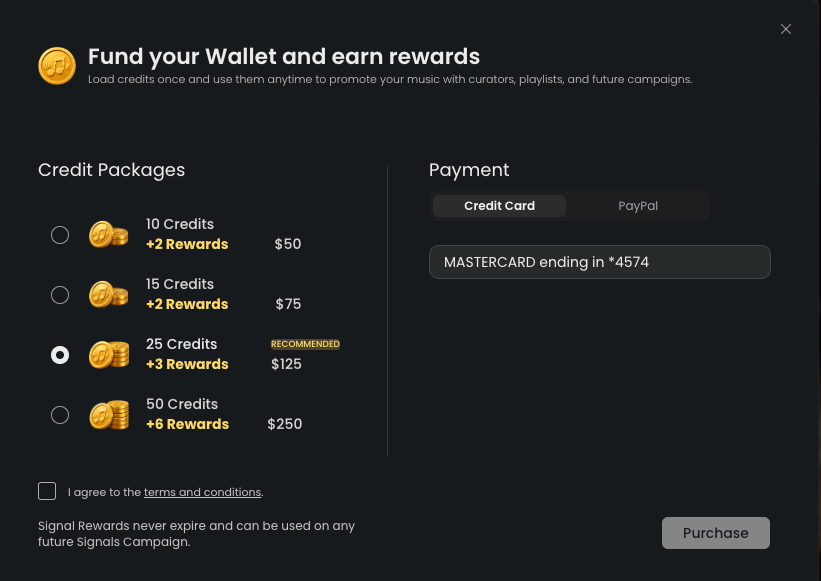
Step 4: Fund your Wallet
Purchase enough credits to cover the items you want to send.
Step 6: Add your Signal
Choose to use a written message, record a new video, reuse your default video, or create a custom one for a specific playlist.
Step 7: Confirm and Send
Review the signal terms (including refund conditions and the 72-hour response window) and send your pitch!
How Do Credits and Rewards Work?
Signals operates on a highly flexible, credit-based wallet system.
- Credits: Pricing starts at $5 for 1 credit. Keep in mind that different playlists require different credit amounts based on their size, activity level, and reach.
- Flexible Purchasing: You can buy the exact amount of credits needed for your current Wishlist, or purchase larger packages to fund multiple submissions at once.
- Rewards: When you buy larger credit packages (custom-built for your artist size), you earn bonus Reward credits that can be applied to future campaigns!
Ready to Grow?
With this brand-new, expanded marketplace, you now have more opportunities than ever to market and expose your music. Signals is the essential new tool that allows you to target playlists within your specific genre with absolute precision, ensuring stronger alignment and better results for all your releases.
Don't miss out on this opportunity to streamline your workflow and accelerate your growth as an artist. Log in and explore the new dashboard today!
For any questions regarding these updates and new features, you can always reach out to us at: support@songtools.io
Key Takeaways:
- A Streamlined Command Center: The V2 dashboard upgrades your workflow, retaining the promotional tools you already rely on while introducing intuitive navigation and a vastly expanded marketplace.
- Smarter, Precision Matching: The Signals Marketplace takes the guesswork out of promotion by automatically connecting you with highly active, genre-matched playlisters tailored to your unique sound.
- Risk-Free, Authentic Outreach: Say goodbye to cold submissions. With customizable video pitching and guaranteed 72-hour feedback (or an automatic refund), your playlist outreach is now a transparent, human conversation.
- Total Financial Flexibility: The new Wishlist and credit-based Wallet systems give you complete control over your budget, allowing you to plan campaigns stress-free and earn bonus rewards as you scale.


