


Successful music promotion has never been about sending your song to as many people as possible. It's about getting the right song in front of the right person at the right moment. When setting up a campaign on SongTools, many artists carefully select their track's Genre, but they often overlook another incredibly powerful tool in the "Track Features" dropdown: the Mood tag.
While selecting a specific genre helps point your track in the right direction, our system doesn't rely on genre alone. Genre and Mood work together to define the artistic intent of your track, but the Mood tag does something uniquely special to help you target playlisters and send Signals.
Here is a deep dive into what the Mood tag actually does, how it complements your genre, and how you can use it to hack your recommendation feed.
Where to Find and Update Your Mood Tag
Adjusting your Mood tag is a quick process, but it requires navigating to the specific track you are working on. Here is how to locate it within your dashboard:
- Navigate to the specific track you are looking to promote or want to focus on.
- On the left-hand sidebar, click on the Marketplace page for that track.
- Look to the top right corner of this page and click on Track Features to open the dropdown menu.
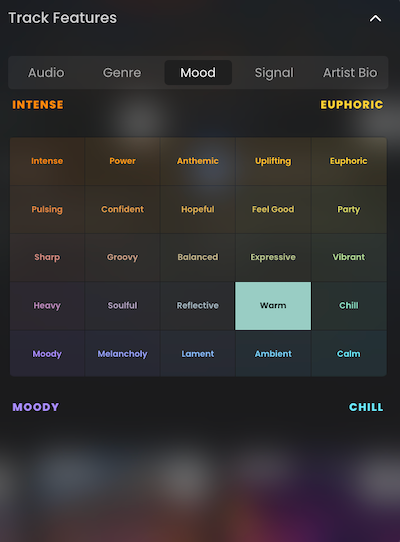
- Within the dropdown, navigate to Mood to select, change, or update your tag.
How the Mood Tag Builds Your "Song DNA"
Everything begins when an artist launches a Playlisting campaign. At that point, the platform begins building a comprehensive profile for your song, known as its Song DNA.
Here is how the Mood tag fits into that ecosystem:
- It Goes Beyond Genre: Rather than relying on simple genre categories, our platform uses your track's broader Song DNA to match it with the most relevant playlists.
- It Captures Emotional Energy: Information like the selected genre and mood comes directly from the artist. This helps the platform understand the musical characteristics and emotional energy of your music.
- It Pairs with Analytics: Your selected Mood is combined with automatically analyzed metadata, musical attributes, past performance, playlister interactions, and GEO data.
- It Connects to Music Match: The compatibility engine uses these mood profiles to organize tracks into four primary mood regions: Intense, Euphoric, Moody, and Chill.
To see the full picture, read our deep dive on How Our Music Discovery Ecosystem Connects Artists and Playlisters.
The Ultimate Hack: Refreshing Your Recommendations
Because the platform is a living ecosystem, every playlist develops a unique "Playlist DNA" reflecting its own musical personality and moods. We currently have over 100,000 playlists in the database.
If you want to explore new targeting opportunities, the Mood tag is your best friend:
- To pull a brand-new set of playlist recommendations into your dashboard for your Signals credits, just change the Mood tag on your track and hit refresh.
Updating your Mood tag instantly forces the system to look at your Song DNA from a new angle. This simple trick ensures you can always find fresh playlisters who are actively looking for your exact sound.
When to Update Your Mood Tag
Timing is everything when it comes to your campaign targeting. Here is when you should be adjusting your Mood:
- Before sending Signals: To get the absolute best-fit matches right out of the gate, you should always set your Mood tag before you start sending out Signals. This ensures our compatibility engine has your complete Song DNA from day one.
- When you need fresh options: If you've already scrolled through your Marketplace feed and haven't found exactly what you're looking for, change your tag! Updating it mid-campaign will instantly refresh your dashboard with a brand-new batch of playlist recommendations.
FAQ's
Does the platform only use my selected genre to find playlists?
No, our system doesn't rely on genre alone. The platform builds a comprehensive "Song DNA" that includes your mood, musical attributes, past performance, playlister interactions, GEO data, and more to match your track with the most relevant playlists.
How do I refresh my dashboard recommendations?
To pull a brand-new set of playlist options for your remaining credits, simply follow the steps to change the Mood tag on your track and hit refresh.
What are the primary mood categories in the Music Match ecosystem?
The Music Match interface organizes its visual landscape into four main emotional regions: Intense, Euphoric, Moody, and Chill.
Key Takeaways
- Emotional targeting is a cheat code: The Mood tag helps the compatibility engine ask if a playlist is the right vibe for your track, moving far beyond broad categories like "Indie Rock."
- Don't settle for your first batch of curators: With over 100,000 playlists in the database, your initial dashboard view only scratches the surface. Adjusting your settings is the easiest way to unlock entirely new audiences.
- Your choices power the whole ecosystem: The exact Mood you select feeds directly into your track's Song DNA, influencing your visibility across the Marketplace, Signal recommendations, and Music Match.


